The Galaxy SIV is here - but does it pack enough of a punch?
Recommended award
The Samsung Galaxy S4 is the most hotly anticipated smartphone ever
from the Korean brand, and with a glut of top end features, it's the
most powerful and desirable device Samsung has created yet.
One of
the most impressive things about the phone is the fact the size hasn't
changed from its predecessor - the Galaxy S4 comes in at 136.6 x 69.8 x
7.9mm (5.38 x 2.75 x 0.31 inches), meaning there's no extra heft to try
to work with in your palm.
However,
despite this fact, the screen on the S4 has been increased once more,
to a whopping 5-inch display with Full HD resolution. This means the
same amount of pixels you'd have seen on a TV that cost well over £1,000
four years ago is now riding around in your pocket.
Let's
not pretend that Samsung is a pioneer in this area though: like a great
many features of the Galaxy S4, the phone borrows a lot from the other
top smartphones of the moment. Both the Sony Xperia Z and the HTC One
have screens that rock the same resolution, but neither of them have
the jaw-dropping clout of the Super AMOLED HD screen on offer here.
On
top of that, there's a much faster processor packed under the hood,
ample storage space for media thanks to an expandable memory card slot,
and the likes of 4G, Bluetooth 4.0, NFC and pretty much any other connection you care to mention on board.
Samsung
has tried to supplement this with a tranche of software upgrades too,
meaning a more powerful camera, a better way to communicate with your
friends and consume media, and interestingly a big push into health
through dedicated apps too.
The Samsung Galaxy S4 costs the same
as the HTC One, give or take a pound or two, on contract. This will
still put it around £35 per month, which isn't too bad for such a high
design.
But
before we dissect all the possibilities the phone has to offer, let's
look at the design. As we mentioned, it's impressive in its form factor,
thanks to the sub-8mm thickness, and at 130g it manages to still be
light without shaving off so much heft that you feel like you've got a
flimsy piece of plastic.
That's
probably the biggest compliment we can pay the Samsung Galaxy S4 -
where its predecessor felt a little bit cheap in the hand, the S4
manages to bring a much more solid build and better construction to
boot.
So while the "faux metal" band makes a comeback on this
model, it looks a lot more premium. And there's very little flex in the
chassis when you hold it tightly, which was another problem with the Galaxy S3 at times.
That
doesn't mean that the phone is completely remodelled from the S3 - it's
very similar in appearance, so much so that a number of people asking
to see it during our review thought we were palming them off with our
old S3. The polycarbonate chassis remains, but that brings with it the
faithful battery cover, which conceals a removable battery and microSD
slot.
We're
not so fussed about the battery being able to drop out of the phone -
so few people carry around a spare battery, and nowadays portable
charging blocks are becoming so cheap and light that they make much more
sense too.
We'd almost prefer something like the Sony Xperia Z,
which has a refined and packaged chassis but doesn't need a removable
battery: it makes use of a slot instead for the memory card. This
integrated nature would make for a slightly more premium feel to the
phone.
However, it's a small gripe with the S4, as while the cover feels flimsy, it's better than it was on the S2 and the S3, and they both sold like hot cakes.
In
the hand, the Samsung Galaxy S4 feels much better than any other
Samsung phone we've held (apart from the gargantuan smartphones the
brand used to make - the i8910 Omnia HD
might have been built like a brick, but it felt wonderful to hold). The
screen's spread towards the sides of the phone means a much narrower
bezel, and the effect is certainly impressive.
It
might look very similar to the S3, but when you take the Samsung Galaxy
S4 up close, you really start to appreciate the nuances.
We'd say it feels a lot more like the LG Optimus G
range now - when we first picked it up, we were struck with how similar
it felt in terms of sturdiness and the polycarbonate construction to
the LG Optimus G Pro.
That's
no criticism, as the device was well built too, but it has a similar
rounded feel. This is intriguing given the history of the two companies,
and shows more of a leaning towards the plastic shell from the Asian
brands in general.
Buttonry
has barely changed from before - the power button has been shifted
slightly on the right-hand side, and is now much easier to hit. Samsung
has clearly taken some lessons from the Galaxy Note 2, which has a really well positioned power/lock button.
The
volume key is less easy to hit, and could be lower down in our eyes,
but the travel on both of these buttons is satisfying, and you'll always
know when you've hit them.
The plastic used on the home key has
been upgraded too, with a more solid feel under the thumb when you press
down to get back to the main home screen. The two buttons flanking it
give you access to menus or take you back from whence you came, and
while both are easily hidden, they light up nicely with an even glow
when called into action.
There are loads of sensors on the front
of the phone above the screen, including cameras to track your eyes, a
2MP camera for HD video calling and a proximity sensor for knowing where
the phone is in relation to your ear. On the white review unit we had,
their presence looks rather ugly either side of the generous earpiece,
but on the darker models this is less of an issue.
The
other notable addition to the design of the Galaxy S4 is the infra red
blaster on the top of the phone. This enables you to control your TV,
satellite box, DVD player, amp and even air conditioner. Again, this
isn't a new feature, but it works well in practice, and despite being
small is powerful enough indeed.
Other than that, there's not a
lot more to say about the design of the phone, as it's just a little
underwhelming. We know it's unfair to lambast a brand for not
overhauling the design every year, but in the One X and the One, HTC has proven that it is possible to offer up a new design each time around and still keep things attractive.
Looking
so similar to the Galaxy S3, you can't help but feel Samsung has gone a
little too Apple and created something more in keeping with the Samsung
Galaxy S3S - a minor update to a great phone to keep those coming out
of contract happy that they have a premium phone to upgrade to.
We
do implore you to get the phone in your hand before making a judgement
though - while it's not got the best design on the market when it comes
to materials, it's a big step forward compared to the Galaxy S3 and
allows for a grippy and easy-to-hold phone, with a whopping screen
inside.
To just dismiss it for being plastic would be doing the S4
a disservice as it has so much more going for it than that, but it's
worth remembering that to a lot of people, the way a phone looks is as
important as how much RAM it's got on board and how fast the CPU is - if
not more so.
Screen
The Galaxy SIV is here - but does it pack enough of a punch?
The Samsung Galaxy S4 has an all-new screen, and we'll state it now:
the Samsung Galaxy S4 has the best display you can find on a smartphone.
It's
the same Super AMOLED technology used in other Galaxy smartphones, but
this time it's been cranked up to Full HD resolution, which is 1920 x
1080 pixels, if you're asking.
This uses the same PenTile matrix
that's drawn so much criticism for Samsung over the years, as some state
that Samsung is using too many of one colour of pixel, or sub-pixel
(the colours within each pixel) is too basic – all of this has meant
that older Galaxy smartphones have had something of a blue or green
tint, or been a little low-resolution when viewed (admittedly really)
close up.
The Samsung Galaxy SWell, and you'll forgive us for saying the same thing that we did last year with the Galaxy S3,
close up now there's no way you can see any jagged edges or elements
within the icons. It's simply superb, and makes everything from web
pages to video look brilliant.
The Samsung Galaxy S2And
there's no worry about the tints of old, nor the criticisms levied at
Samsung for making over-saturated screens, as often people have claimed
that the colours look too strong on these devices thanks to the OLED
technology used.It is a feature of the technology, and not just
because of the high contrast ratios on offer, but with the Galaxy S4
Samsung has added in a mode to make the colours look more natural,
should the user so with to have it that way.
The Samsung Galaxy S3This method does drop the brightness somewhat, and that's already lower than you might find on the HTC One
but that extra brightness isn't needed thanks to the contrast ratio we
mentioned earlier. One of the strengths of OLED technology is that when a
pixel is displaying a black image, it's completely off, and therefore
draws less power and looks darker. Compared to LCD screens, which have a
backlight to light the colours in front, this means that the blacks
will never be as black as found on an OLED.So, as we said,
there's nothing to want for with the Super AMOLED Full HD screen found
on the Samsung Galaxy S4. It might not be as high resolution as the HTC
One, simply because it's larger with the same amount of pixels, but
viewed up close you'll struggle to find a flaw with it.
The Samsung Galaxy S4You
can change the brightness from the notification bar by sliding your
finger up and down the screen - but if you want to make things easier
you can just tag the Auto button and have the Galaxy S4 working away at
deciding the optimum brightness for you.What's new here is the
ability to customise the auto level - so if you like things a little
lighter or darker, then you can choose such a thing. It's a good way to
manage your battery even easier.
Another feature, which is both
good and bad, is the improved capacitive technology used in the screen.
This is designed to ape a feature brought by Nokia on the Lumia 920,
which enables you to wear gloves and still use the phone - which will
be a key feature to those in colder climes, or like to wear gloves for
sport or similar.
However,
while this works well for gloves, it does over-power the screen
somewhat, in that when you're holding your finger over the screen
looking to scroll up and down when you're read a certain paragraph, it
will sometimes register a press when you've no intention of doing so.
It's irritating to say the least, and something that we hope Samsung
irons out with future software updates.
Aside from that, there's
not a thing that we can criticise the Samsung Galaxy S4 screen for in
any way, as it's as close to perfect as you can get on a smartphone -
making it a great device for so many more functions as a result.
Interface
The Galaxy SIV is here - but does it pack enough of a punch?
The interface on the Samsung Galaxy S4 isn't an officially new
release of TouchWiz, the Korean brand's name for its Android overlay,
but it does bring a whole host of new features to the Galaxy range,
working best on the S4.
It's built on top of Android Jelly Bean
4.2, which means there are several significant upgrades from the
previous version, found on most of the other top-end Galaxy devices and,
crucially, ahead of the likes of the HTC One and the Sony Xperia Z.
One gets the feeling Samsung has delayed Android 4.2 for the Galaxy S3
simply so it can offer differentiation with the new model – things like
split menus mean you feel like you're greeted with a different phone,
despite both the S3 and S4 doing roughly the same thing.
So,
for instance, in the drag down notification bar, you're now greeted
with two icons in the top right-hand corner; one takes you to the
internal settings from anywhere in the phone, and the other gives you
quick shortcuts to turn elements within the S4 off and on.
This is
an idea Google pushed with the new iteration of Android, and works
well. However, it's a little redundant here, as the phone already has
these in a long line in the notification bar. You can also edit these
quick toggles too, so it means that you'll rarely push the other button
to get the full list.
Android 4.2 promises further smoothness upgrades too, and while this works on the likes of the Nexus 4, we're not sure what it's really added with the Samsung Galaxy S4.
Considering
that this phone is running the quad-core Qualcomm 600 chip, clocked at
1.9GHz and combined with 2GB of RAM, we would have expected this phone
to run faster than anything we'd ever seen before.
While that is
true for the most part, it's only a touch more than we've seen on the
Galaxy S3. Apps will open and close faster, but elements like the time
taken to open the multi-taking menu (triggered by holding down the home
key from anywhere in the phone) still take a beat to activate.
It makes us hanker for the octa-core processor that other parts of the world are getting - the reason being that 4G
can't apparently be added to that chip very easily, so we have to make
do with a quad core option. It's not as simple as saying that other
version is twice as fast, as it's essentially two quad core chips doing
different tasks when needed, but there's no doubt that the other version
is faster.
In case you're wondering, there are two versions of
the Galaxy S4: one with the Exynos 5 octa-core, and this one (model
number GT-1905) that has the Qualcomm Snapdragon quad core. This version
is clocked at 1.9GHz, which means it runs faster in general - however,
the octa core has two sets of four cores, with one for day to day stuff
and the other for heavy lifting, such as photo processing and such.
While
we're miffed we don't have the option of this other version (it's
smashed the benchmarks in many tests) there are questions about whether
the battery will hold up as well as the device flicks between the two
quad core processors inside - it could improve efficiency or deplete it,
depending on the implementation, so perhaps bigger isn't always better.
The
general Android / TouchWiz interface is still the same as ever: this
means that you can throw as many widgets and apps all over the seven
home screens that you like. It's still a great way of doing things, and
since Android Jelly Bean has been used you can now flick items out of
the way just by dragging them onto the screen and holding them in the
place you want.
What is interesting is that Samsung still hasn't
added the functionality to drag and drop app icons on top of one another
to create a folder. We're pretty sure Apple is trying to patent such an
idea, but given rivals have managed to use this method (such as HTC
with the One) we'd have expected Samsung to do the same.
It's not
a big deal, but having to drag an app to the top of the screen, create a
folder, name it, then drag other apps in is a bit of a hassle.
One
area that has been changed massively from S3 to S4 is the lock screen.
Firstly, there's a new way to mess around with this UI: where once you
could only touch the screen and watch the water ripple around, now you
can choose to have your finger trigger a little light that hovers under
your finger.
Combined with the S4's improved screen technology
that's been super-boosted, in terms of sensitivity, to enable you to use
gloves with it, you can now hold your finger a centimetre or so above
the display and watch the light flicker along under your digit. It's not
a big thing, but one that we found ourselves constantly playing with
like tiny children.
The lock screen, thanks to the Android 4.2
update, now enables you to have widgets on there before you open the
phone, enabling music control, remotes to display and messages to
preview.
While there are some useful implementations of these (the
music player is really handy to have, and can be resized by dragging
the track list up and down) others, like favourite apps, really don't
help as much. You can still thankfully have all the lockscreen
shortcuts, which means you can interact in the same way as before. To
open the phone into a widget you just tap it then swipe below. We
initially wanted to criticise the phone for this, but after a few days
it really becomes second nature.
We
would say the blocky nature of the UI really isn't attractive. It
basically adds a load of features into a previously simple experience,
which may or may not please some people. Thankfully, all this is
switched off by default - and you can even have your own message saying
hello every time you open the phone.
It's clear that Samsung has
toed the Google line in using Android 4.2 on the Galaxy S4, as this lock
screen functionality is straight from the search giant's design board
(with a few Samsung design ideals placed on top).
It's also
present in the menu system, which, rather than one long list of all your
options, is divided into four screens: Connectivity, My Device,
Accounts, and More. It's a neat way of packaging things all up, but it
can be hard to hit the categories on the top given the size of the
screen.
The interface on the Samsung Galaxy S4, to the uninitiated
or the Galaxy S2 user looking for their next upgrade, is great. It has
loads of innovative ideas and works blazingly fast. We can see why some
people find TouchWiz a little cartoony and convoluted at times, but in
our eyes this is a great combination of power and simplicity in a
smartphone.
Messaging
The Galaxy SIV is here - but does it pack enough of a punch?
The messaging experience on Samsung smartphones has never been the
strongest, and thankfully it's getting better and better with each
iteration. We'd go as far as saying that it's actually GOOD on the
Samsung Galaxy S4, and that's coming from a place of wanting to throw
the Galaxy S3 out a window once or twice when the email client doesn't connect properly.
Let's
start with one of the most important points: the keyboard. The previous
Samsung versions have been woeful, with bouncy word prediction,
inaccurate typing and cramped conditions.
Thankfully
with the S4 Samsung appears to have realised this and made a larger
option, and thanks to the larger screen you've even got a row of numbers
on the top so you don't constantly have to keep pressing 'Shift' to get
them up each time. We did a lot, though. Just to let you know.
There's
also a Swype-a-like option on board, and while the jury is still out on
whether this is more efficient that tapping away, we found it to be
more accurate thanks to the larger amount of space afforded by the
5-inch screen.
We still instantly downloaded another option
(SwiftKey might be underpinning a lot of what this keyboard is about,
but the native option is still preferable in our eyes, as it takes less
customisation at the start.)
Text messaging is still a key part of
the Samsung Galaxy S4, and has been slightly upgraded; where there was
just a conversation view with bubbles before, you now get little contact
pictures next to each person, which adds a touch of personality to an
SMS conversation. Yes, again it's not a new experience, but it works
well on the phone.
You've also got a larger capacity for text
messaging than before - where you could only write a missive that was
480 characters or less before converting to a (costly) MMS in previous
versions, now you can have over 5 messages' worth before such a function
kicks in.
Email
The email client on the Galaxy S2
and Galaxy S3 was rubbish, and we've mentioned that already. However
Samsung has taken something of a mallet to that functionality and
interface with the S4 and significantly upgraded it. While the S3 came
close to working as it was supposed to after nearly a year on the
market, the S4 comes out of the gate swinging, if you'll forgive the
mixed metaphor.
This
means a much cleaner UI that makes it much easier to quickly glance and
see who sent each message, a slide-across bar that takes you to your
inboxes (should you have multiple accounts on the phone) and even the
chance to have priority senders and a combined inbox.
So far, so very similar to the recent iOS update (which was similar to the HTC option before it, it should be noted).
But the key thing is here that the client, which was built to be powerful but ended up flawed, now works as it should.
We
can easily set out of office messages, set priority accounts that we
need to panic about (although the process there is a little convoluted
and won't let you search an Exchange server to get the addresses you
need - nobody should have their CEO's email saved as a contact, but if
they email you then you would listen).
ChatON
There are
other options for messaging of course: for instance, ChatON is present
once more (Samsung's attempt to bring a WhatsApp/BBM/iMessage rival) and
brings functionality like being able to send walkie-talkie voice
messages to one another as well as pictures and messages, but there are
so few people using it regularly that it won't be long before you hide
it from the menu screen unless you happen to have a lot of chatty
Samsung friends.
This is something of a shame actually, as it's a
decent platform. You can add a profile pic, send files and the like over
a data connection without having to faff with email, and the range of
customisation options and UI both work very well for the most part.
Once
again, Samsung has shown that it has seen a problem in its older phones
and corrected it accordingly - it might not be market leading but there
wasn't a point where we felt that communication was harder with the
Galaxy S 4, and that's all we're looking for in this scenario.
Calling and contacts
The Galaxy SIV is here - but does it pack enough of a punch?
Contacts are very similar to before on the Samsung Galaxy S4, but
this is no bad thing. Laid out in an easy to read format and manageable
ways of connecting the right people together, this is a perfectly
passable way of looking for the people that matter to you.
The
main thing that we like is the ability to smart dial. This means that
when you open the number pad you can enter the name as you would have
done on predictive text all those years ago - so 3-2-3 would be the
command to bring up 'Dad', for instance.
It's
a slick way of getting around the contact list. It's hardly new - most
phones pack it as an option now, and those that don't (iPhone) sorely
miss it - but it saves you monkeying around in the main contacts list.
That
said, the experience there is very good. If you've got the likes of
Exchange, Facebook and Google accounts set up on your phone then chances
are you'll be able to see a host of names here to play with. We're sad
that Twitter was taken out of the experience, as it was helpful to have
on the Galaxy S2 by enabling you to see friends' Tweets in their contact profile.
However,
if you're not savvy enough to work out how to stop every person you're
following on Twitter displaying in your contacts' list, then you would
have hundreds floating around there.
(By the way, it's a simple
tap of the menu button and selecting 'Contacts to display' where you can
choose which service will supply the people to chat to. You can
customise this too, meaning you only have certain services coming
through, which means you can choose to just have the likes of Facebook
and Google, where most people will store contacts.
Pro tip: hit 'Settings' and then tag 'Only contacts with phone numbers', which will clean up your phone book no end).
Beyond
that, there's not a lot more to the Samsung Galaxy S4 contacts
interface that really makes it stand out - it doesn't have the ability
to parse through albums on social networks or update you with people's
musings through statuses, but to many that's more of a hindrance. And to
those where it's not, you can head on over to the HTC One to see how all that works.
The
interface is simple, it's damned easy to navigate to the people you
want (using the alphabetised list on the right-hand side and then using
the slider to get more exact) and the result is instant when opening a
contact.
You
can link contacts together easily by going into the name and hitting
joined contacts, then selecting other profiles from social networks to
bring everything into one place. Samsung still hasn't mastered the art
of suggesting these links in one big batch, so expect a lengthy time
spend doing so when you turn the phone on.
One big change we're
not sure we're in love with: every contact that doesn't have a picture
drawn in (from the likes of Facebook or Google+) will have a stock
smiling male cartoon face - it's meant to be cutesy, but it can come
across a little creepy when it flashes up onscreen from an unknown
number.
Another oddity with the Samsung Galaxy S4 is the ability
to use high res pictures to populate contact images - other handsets
enable you to define that any social network, Facebook in particular,
will always display HD pictures when you connect a person in your phone
book to the social network profile.
It might sound like a minor
thing, but when high-res pictures flash up during a phone call, it makes
the phone feel a lot more premium, which is rarely the case with the
Galaxy S4, which will only do so if you've linked Google+ or tagged them
in your own photo.
Calling
Calling on the Samsung Galaxy
S4 carries on from its predecessor - namely in being excellent. It's got
a slightly narrow earpiece range, which means that you have to be
careful where you position it in relation to your ear, but that's a
really minor quibble as the overall effect is impressive and works well
thanks to some clever volume management.
The S4 has noise
reduction built in, and many people commented how clear the the sound
was over the airwaves. The S4 supports HD voice as well, which is
carried over the 3G/4G networks (depending on your provider) so you'll
always get the best clarity on offer.
In
short, this phone worked well no matter where we were. Dropped calls
should be a thing of the past on all handsets, but that's not always the
case; however, with high end handsets there's no reason to think it
should happen, and the power of the S4 to keep hold of signal is
impressive.
In fact, the signal strength was regularly impressive,
making very few trips down to the dreaded 'no bar' icon that means you
might have a connection but, hey, you might not. Nobody enjoys that
smartphone lottery, right?
There are a number of extra bells and
whistles to play with here too which offer varying success. You can set
something called 'Adapt Sound' which asks you to pop in a pair of
headphones and listen to a range of sounds at different frequencies,
thus tailoring the output to your ears.
You
can also choose to have 'Clear Sound' or 'Soft Sound' during the calls,
but when we tried these modes all we got was a slight variation in
volume. There are other tricks that are more useful in call, like being
able to turn noise reduction on and off and being able to boost the
volume when needed.
Otherwise, it's the same great calling
experience we've come to expect from the Samsung Galaxy range, even down
to the three options that come up when you end a call (Message, Call or
Video Call) so you can get in touch with the person if you've forgotten
pertinent information. Although video call never works, let's be
honest. Even Apple is starting to wonder...
In short, the Samsung
Galaxy S4 is one of the best phones for actually, you know, phoning, out
there. It's size isn't horrendous next to the ear and people can hear
you - and vice versa. Job done.
If you want to walk out the door right this secord and pick up a
brand new phone then you'll want to know which smartphones have just
made it onto market.
Below are our latest in-depth mobile phone reviews, with all these handsets only recently becoming available to buy.
Sony Xperia J
The
Sony Xperia J is the smaller and cheaper brother to James Bond's Xperia
T, but don't expect to find this handset mingling with scantily clad
women - the Xperia J is far more reserved, less flamboyant, happier to
stay out of the limelight and just get on with life without frenzied car
chases through the French Riviera.
It may not be a wizard on the inside, but overall it offers a respectable smartphone experience at an attractive price point.
Read our Sony Xperia J review
Find Sony Xperia J deals
Nokia Lumia 820
The
Nokia Lumia 820 carries plenty of unique features and costs less than
the Lumia 920, making it a tempting offer for anyone considering making
the move to Microsoft's OS.
Nokia is building a solid line-up of
smooth, competent Windows handsets that started with the original Lumia
line-up last year and continues through to the Windows Phone 8 era. We
feel the Lumia 820 is a building block for that line-up rather than its
superstar focus.
Read our Nokia Lumia 820 review
Find Nokia Lumia 820 deals
Nokia Lumia 920
The
big-boned Lumia 920 is the most feature-packed of the initial Windows
Phone 8 line up, as Nokia looks to regain its dominance in the WP market
and ride the new OS wave to success.
It isn't a groundbreaking, game-changing device, it's a refreshed Lumia 900 with a newer operating system and some additional power.
That's
not to say it's a bad phone, what Nokia has produced is a solid,
well-built device which does the job you'd expect of a smartphone,
without any of the lag we sometimes see from the convoluted Android
system.
Read our Nokia Lumia 920 review
Find Nokia Lumia 920 deals
Google Nexus 4
Some
handsets we look forward to with much anticipation – only to feel
deflated when we actually use them. Others, we wait for with little
expectation – and they absolutely blow our socks off.
A stealth surprise. We'll lay our proverbial cards on the table here from the outset. The Nexus 4 is one of those rare devices.
The
Nexus 4 cames SO close to racking up a 5 star review, it's unreal. This
phone has some of the best specs around but it's not just great value,
it's fantastic value. Almost too good to be true. Why did it miss out on
the top mark? Find out in our review.
Read our Google Nexus 4 review
Find Google Nexus 4 deals
HTC 8X
A
splash of colour, Microsoft's latest mobile platform and a sleek new
body are combined with more powerful hardware - is the 8X the phone to
bring Windows Phone 8 to the masses?
The
HTC 8X should have been the comeback Windows phone – it has it all on
paper: a brand new updated OS, great looks and top connectivity options
(minus 4G).
Plus, it came to market before the attention-seeking Nokia Lumia 920
and yet, despite us being really, really excited to get our mitts on
it, we couldn't help feel a little bit 'meh' about the whole experience
once we did.
Read our HTC 8X review
Find HTC 8X deals
HTC One X+
The HTC One X+ isn't exactly a new handset as such, as it shares many similarities with its brother the HTC One X, but there are a few key upgrades in play here.
The
One X+ is here to put the issues we experienced with the One X, such as
battery life and limited storage, to bed and possibly snatch top spot
away from the immensely popular Galaxy S3.
The HTC One X+ had the potential to be the first five star smartphone since the Samsung Galaxy S2, but unfortunately it quite literally run out of juice before the final hurdle.
Read our HTC One X+ review
Find HTC One X+ deals
Check out our list of the latest mobile phones around
In the ever-changing mobile market, it can be hard to keep pace with
the latest mobile phones. That's why we've put together this hub for our
latest mobile phone reviews and hands on: to give you the ideal
jumping-on point for choosing the best handset for you out of the most
current models around.
We cover a plethora of brands, including
Apple, HTC, Nokia, Samsung and Blackberry, and operating systems, such
as Android, iOS and Windows Phone 8, so you should find something that
piques your interest here.
In short, if you're seeking a new mobile phone, this is a great place to start.
Hands on
These phones are so new we've not even received a unit to put through our full review process yet.
Luckily
TechRadar travels the world to get hands on with all the latest
handsets as soon as they're announced, so we can give you our initial
reaction right here, right now.
Huawei Ascend G330
After the success of the wallet-friendly Ascend G300 the Chinese manufacturer has decided to reboot the handset with the Huawei Ascend G330.
Expected
to sport the same £100 price tag, the Ascend G330 features a 4-inch
display, beefed up 1GHz dual-core processor, 512MB RAM, 5MP rear camera
and Android 4.0 Ice Cream Sandwich.
The
handset itself is pretty uninspiring, but you're not going to get
iPhone-esque styling on a device which is one fifth of the price so we
can forgive Huawei here, but at 130g it's got a weight to it.
Unlike
Samsung and HTC, Huawei doesn't go overboard with its Android overlay,
with just a light sprinkling occurring on the ICS interface on the G330 –
although icons have been changed, and look a little childish.
With
its impressive spec sheet for the cash you'll pay out, the Ascend G330
could well be the new star of the budget smartphone market. Keep an eye
out for our full review, when we'll reveal if it's really worth it.
Read our hands on: Huawei Ascend G330 review
HTC 8S
The HTC 8S in second in line to the Windows Phone 8 crown at the Taiwanese firm, with the flagship 8X still the show at the top of the tree.
However
that's not to say the 8S should be ignored, it's still a perfectly
capable and well designed handset which won't cost you a huge amount of
money.
The 8S will go head to head with the mid-range Lumia 820,
with its fancy array of colour options, 4-inch HD display, 1GHz
dual-core processor and the welcome addition of a microSD card slot –
something which is missing from both Nokias and the 8X.
An
advantage HTC has over its rivals is its partnership with Dr Dre and his
Beats Audio technology – enhancing your music with added bass to really
get the party started.
Design wise we reckon the Taiwanese firm
is on to a winner with the HTC Windows Phone 8S, but we'll reserve
proper judgement until we've fully reviewed it.
Read our hands on: HTC 8S review
Find HTC 8S deals
Samsung Ativ S
Not wanting to miss out on the Windows Phone 8 party, mobile giant Samsung has its own handset on the way, in the form of the Ativ S.
Taking design cues from the extremely popular Samsung Galaxy S3, the Ativ S offers up a solid Windows Phone experience and is ready to challenge the likes of the Nokia Lumia 920 and HTC 8X.
The
Ativ S is an intriguing proposition packing a huge 4.8-inch display,
1.5GHz dual-core processor, huge 2,300mAh battery and an 8MP rear
camera.
Although slower to market than its rivals the Samsung Ativ
S could well be the best of the initial flurry of Windows Phone 8
devices.
Read our hands on: Samsung Ativ S review
Find Samsung Ativ S deals
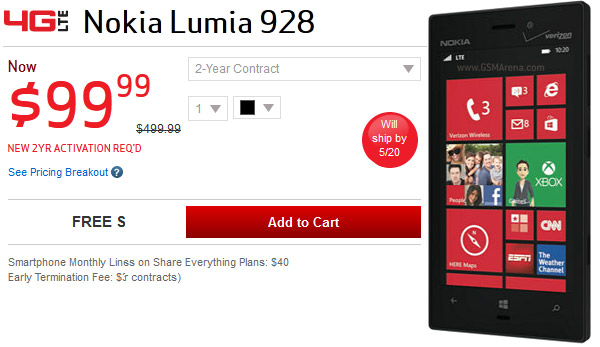
Verizon's WP8 flagship, the Nokia Lumia 928, is available for pre-order
right now. It's priced $99 with a new 2-year contract or $499 with
month to month service. The black one will ship by May 20, but when you
select the white model, the "Will ship by..." label disappears.
Note that the $99 price is after a $50 online discount. For a limited
time you'll also get $25 credit for the Windows Phone Store.
Both Black and White versions of the Lumia 928 are also available on Amazon,
but there's no shipping date and they cost more - $199 with contract
and $549 without. Still, if you're not in a hurry, Amazon usually offers
better deals than the carriers some time after a phone's launch. Via
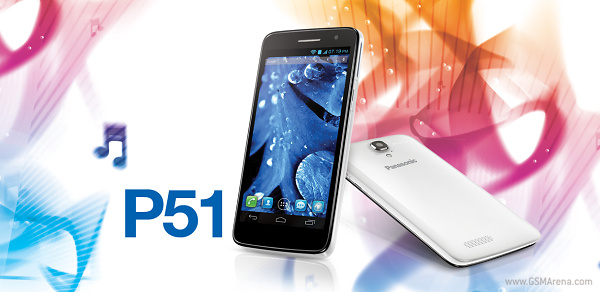
Panasonic has launched its
first Android smartphone in India and has marked its entry into the
overcrowded smartphone segment in the country.
Panasonic P51 sports a 5-inch display with a resolution of 1280 x 720
pixels and a 1.2 GHz quad-core MediaTek processor along with 1 GB of
RAM. P51 also features an 8 megapixel rear camera with the ability to
shoot 1080p videos, 1.3 megapixel front camera and 4 GB of internal
memory that can be expanded via the microSD card slot.
The device measures 144 x 75 x 8.5mm and weighs 135g. Panasonic P51
runs on the latest Android 4.2 Jelly Bean and the juice for smartphone
is provided by a 2,500mAh battery.
Panasonic P51 is priced at INR 26,900 (about $517) and the retail
package include a magnetic flip cover and a stylus. The smartphone will
be up for grabs, starting from next week. It's unclear what other
markets will be getting the smartphone. Source
LG has supposedly sent
invitations for the announcement of a new Taiwan-exclusive handset
called Optimus GJ - an IP57-version of the popular Optimus G.
The IP57 certifications means the LG Optimus GJ will last for 30 minutes under one meter of water.
The rest of the specs are identical with the international Optimus G. NTT DoCoMo is already offering the same device on the Japanese market.
The LG Optimus GJ should be announced on May 22 in Taiwan. Source | Via
Analyst firm IDC
released its report for the first quarter of 2013, which chronicles big
rises and great falls. There's nothing new at the top – Android and iOS
account for 92.3% of smartphone shipments - but the fight for third
position is heating up.
Android is still in the lead (in fact, it's widening its lead) and
grabbed 75% of the sales. Samsung is by far the biggest Android maker,
with a share of 41.1%. Other Android makers have single digit market
shares, with some falling below the 1% threshold.
Apple shipped the greatest Q1 volume of iPhones ever, but even with
that saw iOS market share decline to 17.3% (from 23% in Q1 2012).
Android and iOS together account for 199.5 million smartphones
shipped in the first quarter of 2013, up 59.1% over Q1 of the previous
year.
Windows Phone was the fastest growing OS and jumped into third place
with 3.2%. Nokia is the main driver of WP growth, with nearly 80% of all
Windows Phone handsets sold in Q1 carrying the Nokia logo. Nokia has
shipped 20.3 million Lumia phones in total.
BlackBerry slipped from third to fourth place (6.4% market share to
2.9%) but there is some good news, its new BlackBerry OS 10 has sold 1
million smartphones during its first quarter of availability (that's
just the Z10, the Q10 and Q5 were unveiled just a few days ago). Still,
the majority of BlackBerry smartphones shipped in the first quarter ran
on the old BB OS 7.
Linux held on to 1% market share (down from 2.1%) but there are
plenty of new OSes incoming - Tizen, Mozilla, SailFish and Ubuntu.
Symbian saw the biggest decline in market share, down to just 0.6%.
Small surprise since Nokia and Japanese carriers (the last bastions of
Symbian) have moved on. Still, IDC expect the veteran OS to live on in 2014 with very small shipment volumes.
Sony seems to have a lot going on in its labs. After the Xperia Z and Xperia ZL hit the market, the Japanese manufacturer announced the Xperia L, Xperia SP and Xperia ZR. Then, a mysterious new device - Xperia i1 Honami - entered our rumor mill that will supposedly revive the Cybershot lineup. The Xperia A and Xperia S39h followed suite not long after Honami.
Today we have another unannounced Xperia smartphone churning around the rumor mill - the Sony Xperia UL codenamed Gaga. Sony Xperia UL
The Xperia UL (might not be released under that name) is powered by
the quad-core Snapdragon 600 chipset (the same as what's ticking inside
the Samsung I9505 Galaxy S4)
and features a 1080p display, 2GB of RAM and 32GB expandable internal
storage. The last known detail is the battery - a 2300 mAh unit.
Looking at the rubber isolation we can safely bet the Xperia UL will be water and probably dust proof.
That's all we know on the Sony Xperia UL so far, but we'll follow the news on this one closely, so be sure to check back soon. Source (Chinese) | Via
Google officially announced via Twitter that its Wallet service is
now available for the Sprint variations of the Galaxy S 4 and HTC One
smartphones, as well as the Sprint and U.S. Cellular variations of the
Galaxy Note II smartphone as well. This means that all owners of those
phones will need to do is simply visit the Play Store and grab the
latest update in order to get in on the awesome payment action.
Naturally, it would be nice for more devices to take advantage of the
great service, but at least Sprint as usual, is ensuring its customers
can take advantage of the awesome service.
Hit the link below to grab the latest update.
Summary:
Google TV will finally be upgraded from Android 3.2 aka Honeycomb
when it receives the next major system update later this year. The new
version will be based on Android 4.2.2.
Google will update its Google TV platform to Android 4.2.2, the company announced on Google+ Wednesday.
The update will be rolled out to existing devices in the coming months,
and it will bring all the major features of the latest version of
Android and Chrome to TV screens.
From the announcement post:
“Today, Google TV is
moving to the latest version of Android (Jelly Bean, 4.2.2), and we’ve
refactored Google TV so that our TV OEM partners can update to future
versions of Android in a matter of weeks rather than months. For
developers, this means you can build TV experiences using the latest
Android APIs, including the NDK.
Today Google TV is also moving to the latest version of Chrome, and
from now on Google TV benefits from Chrome updates on the same six week
cycle that you’ve come to expect from Chrome. In Chrome on Google TV,
we’ve added support for hardware-based content protection, enabling
developers to provide premium TV content in HD within their web apps.”
Some Google TV hardware partners have been working with the new version since February.
This will be a big step for Google TV, which has been based on
Android 3.2, or Honeycomb, since the last major OS update in late 2011.
However, some Google TV owners won’t be able to take advantage of the
update: A Google spokesperson confirmed Wednesday that it will only be
available for ARM-based Google TV devices, and not on first-generation
Intel-based Google TV set-top-boxes and TVs.
Coming next to Google TV: video games?
The update could bring a number of new features to Google TV that
owners of newer Android handsets take for granted, including a better
performance, a much-needed UI-update and an all likelihood some form of
Google Now integration. It should also help developers by making it
easier to port their Android 4.x-optimized apps to Google TV.
But there’s another aspect that’s interesting about this step: Google
also announced Google Play games services, a cloud gaming service that
makes it possible to develop multi-player games and save game plays
across devices, at I/O Wednesday.
With Google TV switching to Android 4.2.2, it’s reasonable to assume
that Google TV devices should have access to Google Play Games sooner or
later as well. This could give the smart TV platform, which has so far
only seen modest adoption, another leg to stand on, and potentially
enable future Google TV devices to function as full-blown game consoles
as well. This post was updated at 1:35pm with additional information about the devices that will receive the update.